A GPS tracker can report much more than a vehicle's location. When the device supports BLE accessories, it can also receive nearby data from temperature, fuel, pressure, door, emergency button, and other sensors installed on the asset.
In this update, we expanded BLE accessory handling in ALTAGAMA GPS. Their parameters can be viewed on the map, each accessory can receive a meaningful name, and readings can be mapped to the sensors the operation needs to analyze.
What BLE accessories mean in GPS tracking
BLE is a short-range, low-power wireless communication technology. In a compatible installation, an accessory sends its status or measurement to the tracker, and the tracker includes that information with the locations sent to ALTAGAMA GPS.
This model reduces the need for wired connections for certain sensors and lets one tracker work with several accessories. Compatibility depends on the tracker, protocol, accessory, and installation settings.
ALTAGAMA GPS can recognize several accessory types, including pressure sensors, SOS buttons, driver identification, temperature and humidity, doors, relays, fuel, analog inputs, and temperature. The effective list depends on what each model supports and reports.
Accessory readings visible on the map
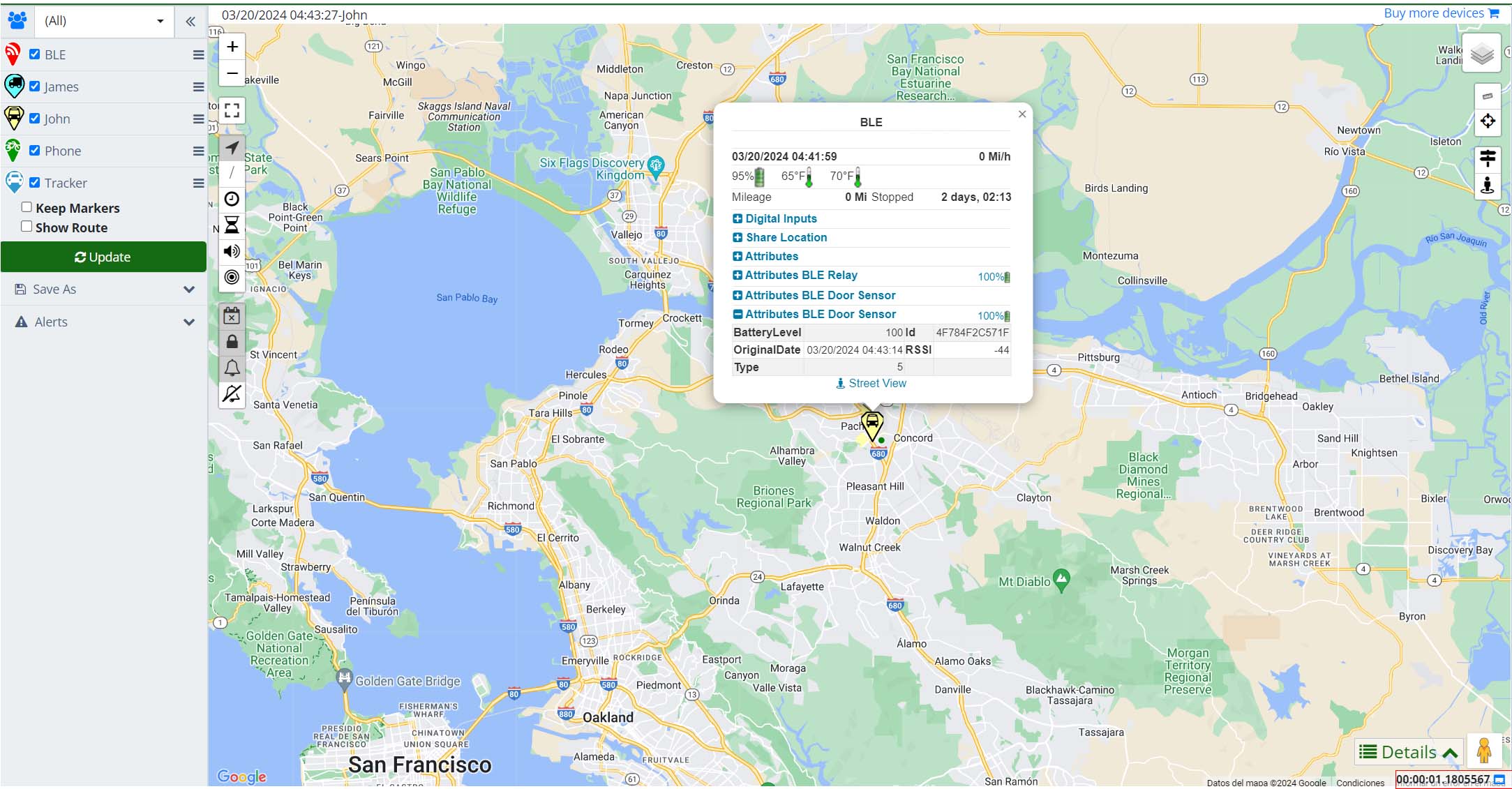
Parameters sent by accessories now appear among the location attributes on the map. After selecting a device, users can review its position together with the additional information received at that time.
This adds operating context. A coordinate shows where the asset was, while an attribute may show its temperature, a door status change, or the activation of a compatible button.
Values are presented with available names and formats, and dates contained in attributes are converted to the user's time zone. This reduces manual time conversion before comparing an attribute with a route or event.
Accessory attributes on a location
The original image below shows how ALTAGAMA GPS presents additional attributes associated with a position.
Identify and manage each accessory
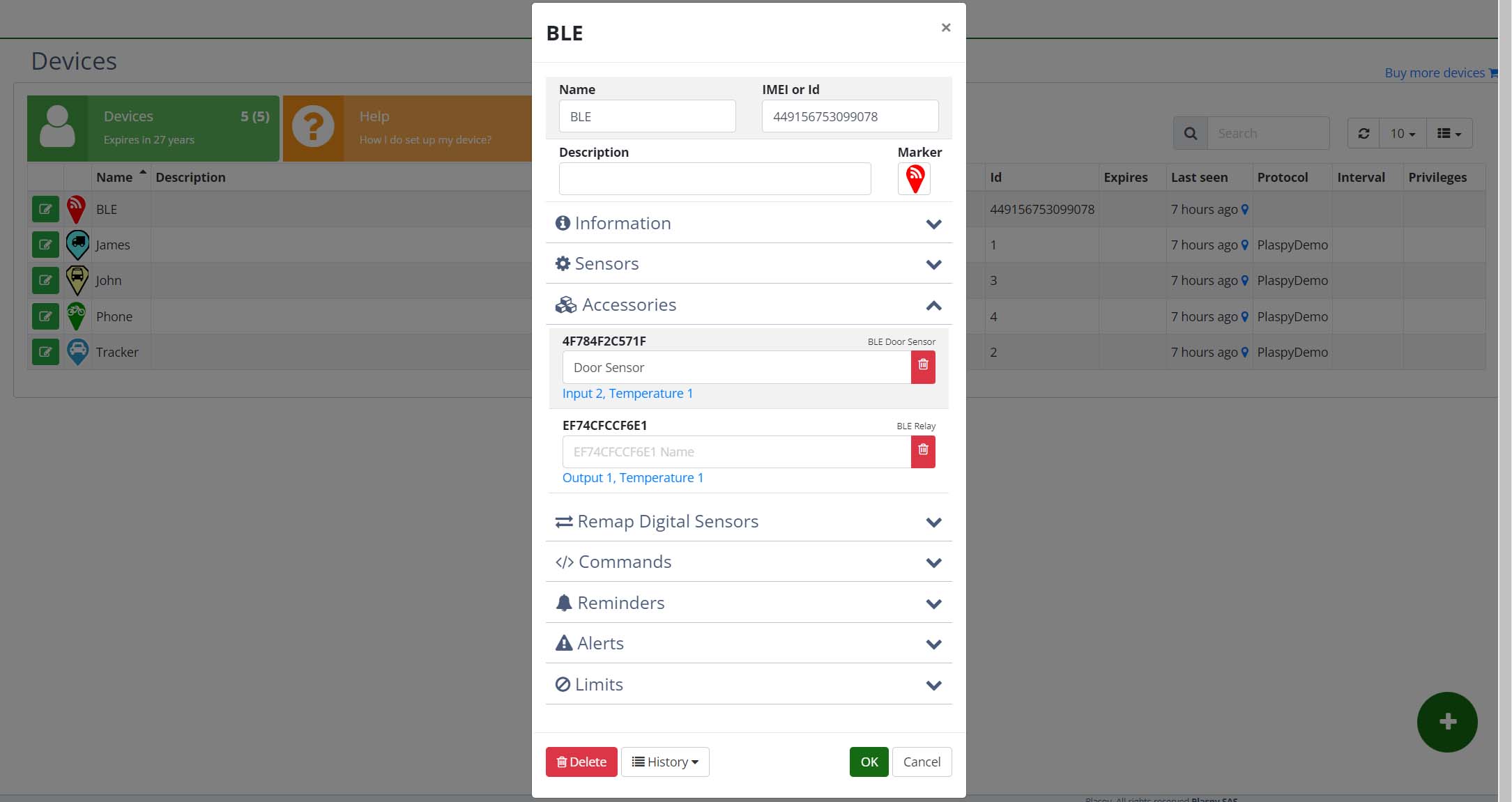
When a tracker reports several accessories, a technical identifier does not always explain where each one is installed or what it does. ALTAGAMA GPS lets users assign a custom name for quicker recognition.
A company can use names such as “Front compartment temperature,” “Rear door,” “Cab button,” or “Main tank.” The name becomes a reference so operators and technicians discuss the same physical element.
The device screen brings detected accessories and their settings together. Users can review the reported type, change the name, and decide how the accessory should relate to sensors available in ALTAGAMA GPS.
Detected accessories in device settings
The original screenshot shows the area used to identify and name accessories associated with a compatible tracker.
Map accessories to temperature, fuel, inputs, and outputs
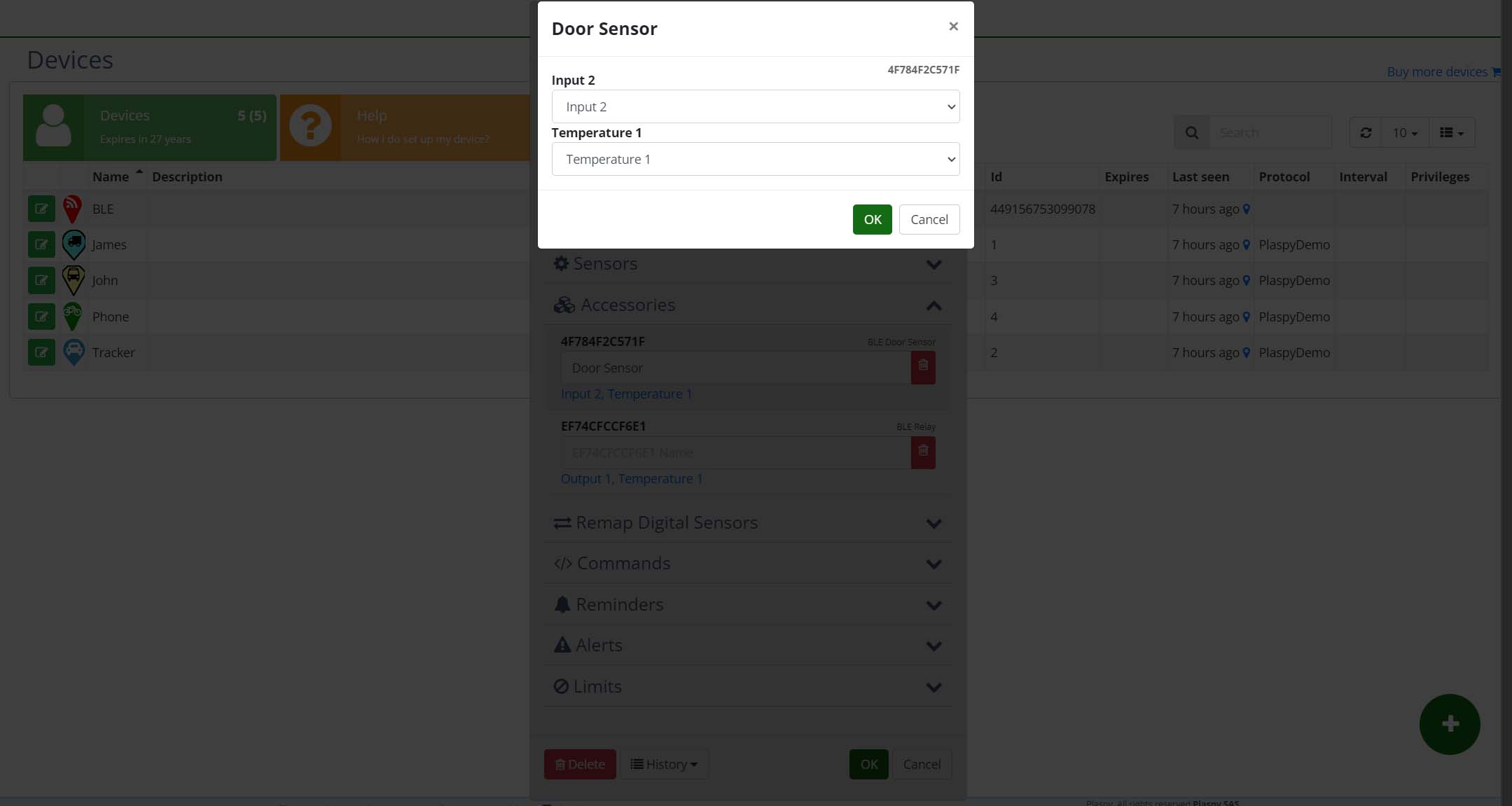
An accessory may report a general capability, while the operation needs to decide which ALTAGAMA GPS field should represent the reading. Mapping associates the accessory with digital inputs, outputs, analog inputs, temperature sensors, or fuel sensors.
This is especially useful when several accessories have the same type. A company can map two sensors to Temperature 1 and Temperature 2, or distinguish measurements from two tanks with Fuel 1 and Fuel 2.
After mapping, the reading can participate in tools that use that sensor, provided the tracker sends the expected data. Users can still rename the accessory so its label matches the physical installation.
Assigning an accessory to a ALTAGAMA GPS sensor
The original image shows the selection used to connect an accessory with the corresponding sensor.
Temperature and fuel continuity between locations
Some trackers do not repeat every value in each message. If a new location does not include temperature or fuel again, a screen could appear empty even when the last valid measurement remains relevant.
We improved persistence for these values to preserve continuity between locations when appropriate. History and map views no longer immediately lose a reading only because the next message did not repeat it.
Continuity is not the same as a new measurement. Users should consider the reading time and reporting frequency, especially when a value can change quickly.
Expanded compatibility with the T800x protocol
We updated T800x message interpretation to recognize compatible accessories and connect their data with ALTAGAMA GPS parameters. Supported cases include pressure, SOS buttons, identification, temperature and humidity, doors, relays, fuel, and analog signals.
This improvement makes more information available from T800x devices that support those accessories. Installers must verify the model, version, configuration, and specific compatibility; devices with a similar commercial name do not necessarily send the same data.
For integrators, the recommended process is to connect one accessory, confirm that the tracker detects it, verify its appearance in ALTAGAMA GPS, map the appropriate sensor, and compare the reading with a known measurement.
Real-world BLE sensor applications in a fleet
- Cold chain: monitor compartment temperature and relate it to the vehicle's route.
- Fuel: review levels or measurements sent by compatible accessories and analyze them by period.
- Cargo security: identify door status changes or an emergency button activation.
- Identification: associate driver accessory information with tracker activity.
- Pressure: view compatible accessory data to guide preventive inspection.
- Inputs and outputs: map accessory signals to channels already used by the operation in ALTAGAMA GPS.
These applications depend on installation quality, wireless range, accessory power, and how often the tracker includes readings in its messages.
AI questions about current statistics
The statistics section also introduced assisted queries about generated results. Users can select devices and periods, generate supported statistics, and ask in natural language which values stand out or which differences should be reviewed.
A temperature operation can request a device comparison, while a fleet can ask for a summary of available values. The response helps orient the analysis, but original locations and measurements remain the source that must be verified.
The assistant does not create data from a missing sensor or replace critical alerts. Companies should configure and test appropriate notifications when immediate response to a condition is required.
Benefits for customers and integrators
- More operational context alongside each GPS location.
- Custom names that identify accessories according to the actual installation.
- Flexible mapping to temperature, fuel, inputs, outputs, or analog channels.
- Continuity for the latest valid readings between compatible locations.
- Attribute dates displayed in the user's time zone.
- Assisted statistics analysis to prioritize human review.
Technical implementation summary
- Accessories are registered by the identifier and type reported by the tracker.
- Configuration supports custom names and mapping to ALTAGAMA GPS sensors.
- Received parameters can appear as location attributes on the map.
- Temperature and fuel retain continuity when the following message does not repeat the applicable value.
- Dates contained in attributes are presented in the user's configured time zone.
- The T800x protocol expands interpretation of compatible BLE accessories.
- Availability requires compatibility among the tracker, accessory, protocol, and transmitted data.
Explore tracking, sensors, alerts, statistics, and history in the ALTAGAMA GPS plans and features.