
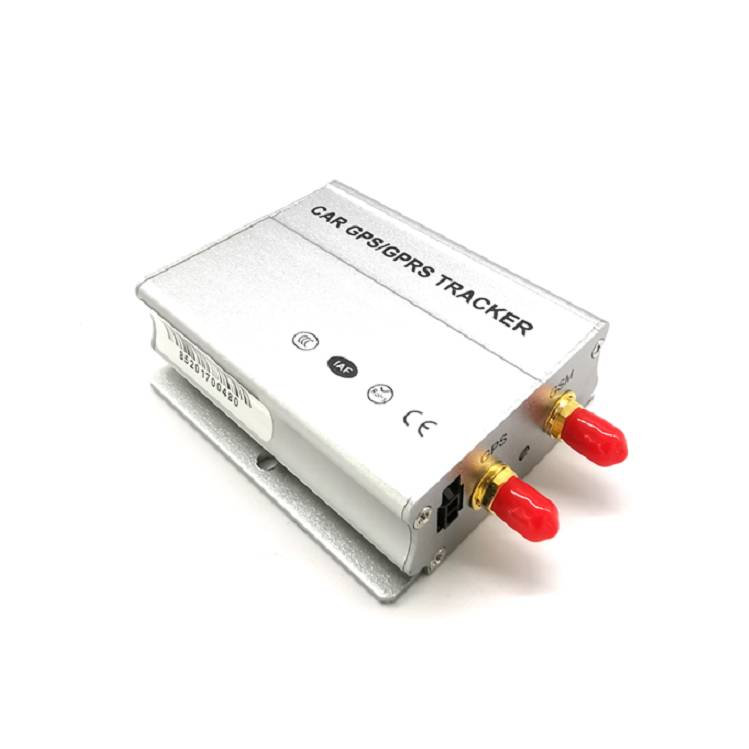


TS-V1 Professional Vehicle GPS Tracker
The TS-V1 is a compact, hardwired GPS tracker built for professional fleet management, theft prevention and vehicle telemetry. Designed for installation in commercial vehicles, construction machines, rental cars and private vehicles, the TS-V1 delivers reliable real-time tracking, geo-fencing, mileage statistics and remote control features such as fuel/power cut-off and SOS alarms. Its rugged design, broad operating voltage range and removable backup battery make it suitable for continuous fleet operation.
ALTAGAMA GPS compatible out of the box, the TS-V1 integrates with third-party online positioning platforms via configurable IP/port settings and supports both SMS and platform-based command/control. That makes it straightforward to add this GPS tracker to your ALTAGAMA GPS setup for centralized real-time tracking, fleet management, anti-theft response and telemetry reporting.
Key Highlights
- ALTAGAMA GPS compatible: configurable IP/port and platform-friendly protocols for smooth integration with ALTAGAMA GPS dashboards and alerts.
- Real-time tracking: high-sensitivity SiRF III or U‑blox GNSS chip provides approximately 5 m position accuracy for reliable location updates.
- Wide cellular support: 2G/3G/4G support (bands depend on destination country) for global connectivity choices.
- Fleet management ready: mileage statistics, ACC/ignition monitoring and over-speed alerts to support operational visibility and reporting.
- Anti-theft & remote control: SOS alarm, compatibility with original vehicle anti-theft systems, and remote fuel/power cut-off outputs.
- Robust power design: DC 9–36V input with removable 3.7V/600 mAh backup battery for continued operation during power loss.
- Flexible I/O and sensors: multiple digital inputs, one analog fuel input and optional temperature/fuel sensors for expanded telemetry.
How It Works with ALTAGAMA GPS
Integrating the TS-V1 with ALTAGAMA GPS enables a unified view of vehicle location and status. Install the hardwired unit in the vehicle, connect the supplied GPS and GSM antennas, configure the device to point to your ALTAGAMA GPS server (modify IP and port if required), and the unit will upload position and event data in real time. ALTAGAMA GPS then handles visualization, geo-fence management, alerts and historical reporting.
- Real-time location and telemetry updates sent to ALTAGAMA GPS for live map tracking and history playback.
- ACC/ignition status monitoring for engine-on/engine-off events and accurate mileage calculation.
- Fuel monitoring via the analog input for fuel sensors (e.g., TS-C11) to support fuel monitoring and consumption reports.
- Remote cut-off outputs for fuel or power circuits—use ALTAGAMA GPS or SMS commands to immobilize a vehicle when required.
- SOS, movement, over-speed and geo-fence breach notifications forwarded to ALTAGAMA GPS for instant operator alerts.
- Remote voice monitoring and compatibility with vehicle anti-theft alarms to enhance recovery and incident verification workflows.
Technical Overview
| Connectivity | 2G / 3G / 4G (model/bands depend on destination country) |
|---|---|
| Bands | Country-dependent cellular bands (configurable by model) |
| Power & Battery | Operating voltage DC 9V–36V; internal removable rechargeable 3.7V / 600 mAh Li‑ion backup battery (used as backup) |
| Interfaces | 3 digital inputs (including ACC), 1 temperature sensor input (TS-C5), 1 SOS/open-door input; 2 digital outputs (remote fuel/power cut-off); 1 analog input for fuel sensors (e.g., TS-C11) |
| GNSS | SiRF III or U‑blox GPS chip; sensitivity -159 dBm; accuracy approx. 5 m; TTFF: Hot 1s, Warm 35s, Cold 45s, Reacquisition 0.1s |
| Bluetooth | Not listed in device specifications |
| Remote Management | Configurable IP and port; supports SMS and online platform command/control for remote configuration and actions |
| Form Factor & Environmental | Dimensions 95 × 75 × 25 mm; Weight 0.459 kg; Operating temp -20°C to +70°C; Storage -40°C to +85°C; Humidity 5%–95% non‑condensing |
Use Cases
- Fleet management: real-time tracking, mileage reporting and over-speed alerts to optimize routes and driver behavior.
- Anti-theft and recovery: SOS alarm, compatibility with vehicle anti-theft systems and remote fuel/power cut-off for fast response.
- Remote diagnostics & telemetry: ACC status, analog fuel input and optional temperature sensor feed into ALTAGAMA GPS for ongoing vehicle health and fuel monitoring.
- Construction and specialty vehicles: rugged operating range and wide voltage support make the TS-V1 suitable for heavy equipment and special-purpose fleets.
- Rental and shared vehicles: geo-fencing, movement alerts and remote immobilization help enforce usage policies and reduce misuse.
Why Choose This Tracker with ALTAGAMA GPS
Pairing the TS-V1 with ALTAGAMA GPS gives fleet operators a dependable, easy-to-integrate solution for real-time tracking, telemetry and anti-theft control. The TS-V1’s professional I/O set (ACC, analog fuel input, SOS, digital outputs) and configurable connectivity settings enable fast onboarding into ALTAGAMA GPS-managed fleets without complex firmware changes. You get precise GNSS positioning, event-driven alerts and remote actuation (fuel/power cut) that ALTAGAMA GPS can turn into automated workflows, reports and operator alerts. This combination supports scalable fleet management, strengthens anti-theft defenses and centralizes vehicle telemetry for better operational decisions.
Set Up TS-V1
To set the tracker send the following commands by SMS messages, the sample setup the device password is BB6pjS, this password is the default
- Factory reset
FORMAT - Set the operator APN
apnBB6pjS {{apn}} - Set the APN username
apnuserBB6pjS {{apnu}} - Set the APN password
apnpasswdBB6pjS {{apnp}} - Set the GPRS server
ip54.85.159.138 8888
To check settings CXZT