
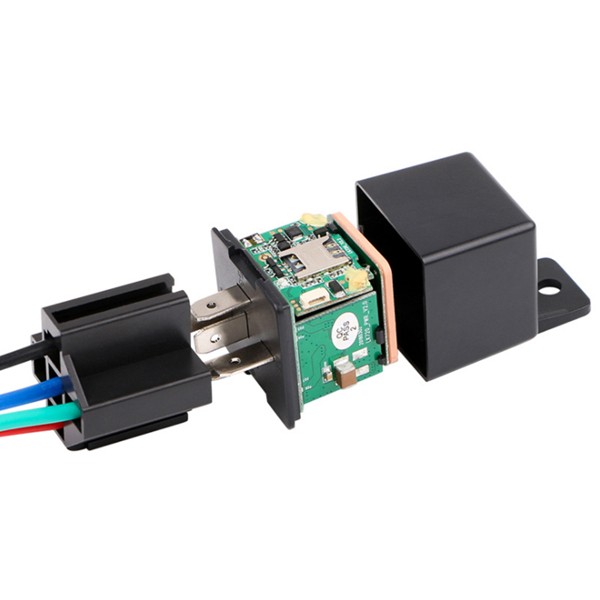


The TK720 relay GPS tracker is a compact, lightweight tracking solution ideal for motorcycles, cars, rental vehicles and light equipment. Built around a UBLOX GNSS receiver and multi‑positioning methods (GPS, Beidou, GLONASS, LBS and Wi‑Fi), the TK720 delivers reliable outdoor and indoor location data and integrates seamlessly with ALTAGAMA GPS for ALTAGAMA GPS compatible, real‑time tracking and fleet management.
The TK720 provides a focused set of security and management features — sensitive vibration detection, geo‑fencing, move and over‑speed alerts, plus remote engine cut‑off/immobilizer control — while storing historical route data on the server for approximately six months. When paired with ALTAGAMA GPS, fleet managers and vehicle owners get immediate alerts, route playback and telemetry reporting that supports anti‑theft workflows and operational oversight.
Key Highlights
- ALTAGAMA GPS compatible real‑time tracking via SMS, mobile app and web platform for live fleet visibility.
- Multi‑GNSS positioning (GPS/Beidou/GLONASS) plus LBS and Wi‑Fi for dependable outdoor and indoor location.
- Sensitive built‑in vibration sensor produces instant alerts on even slight impacts for anti‑theft response.
- Geo‑fencing, move alerts and over‑speed notifications to enforce routes, zones and driver behavior policies.
- Remote engine cut‑off and resume (relay control) for vehicle immobilization and recovery operations.
- Compact, lightweight form factor designed for discreet installation on motorcycles, scooters and light vehicles.
- Server‑side historical route storage (approx. six months) for audits, telemetry review and trip analysis.
How It Works with ALTAGAMA GPS
When installed in a vehicle or asset, the TK720 periodically reports position and key event data to ALTAGAMA GPS over GSM/GPRS. ALTAGAMA GPS ingests the tracker’s location and alert telemetry and presents it in dashboards, maps and reports suitable for real‑time tracking and fleet management workflows. Alerts and commands travel between the device and ALTAGAMA GPS so authorized users can monitor status, review history and take remote action when needed.
- Real‑time location and telemetry updates delivered to ALTAGAMA GPS for live tracking and map visualization.
- Vibration/impact alerts, over‑speed and move alerts are forwarded instantly to ALTAGAMA GPS for notifications and escalation.
- Geo‑fencing events trigger ALTAGAMA GPS notifications and automated workflows when a vehicle enters or leaves predefined zones.
- Remote immobilizer/engine cut‑off and resume control routed through ALTAGAMA GPS for secure recovery or vehicle disablement.
- Historical route playback on ALTAGAMA GPS using up to approximately six months of stored server data for audits and driver behavior analysis.
Technical Overview
| Model | TK720 |
|---|---|
| Connectivity | GSM / GPRS |
| Bands | 850 / 900 / 1800 / 1900 MHz |
| GNSS / Positioning | GPS (UBLOX), Beidou, GLONASS, LBS, Wi‑Fi |
| GPS Sensitivity | -159 dBm |
| GPS Accuracy | Approximately 5 m |
| TTFF | Cold 35–80 s; Warm ~35 s; Hot ~1 s |
| Power & Battery | Operating voltage 10–50 V; Rechargeable 3.7 V Li‑ion battery (100 mAh) |
| Standby Time | Approximately 1 day (battery backup) |
| Inputs / Interfaces | Compact relay output for remote engine cut‑off / immobilizer control; built‑in vibration sensor; digital event reporting |
| Storage | Server‑side historical route storage up to ~6 months |
| Operating Conditions | -20 °C to +55 °C; humidity 5%–95% non‑condensing |
| Storage Temperature | -40 °C to +85 °C |
| Dimensions & Weight | 31 × 31 × 57 mm; 50 g |
| Bluetooth | Not specified |
| Remote Management | SMS, mobile app and web platform reporting and control (ALTAGAMA GPS integration) |
| Form Factor | Compact relay tracker for motorcycles, cars, rental vehicles and light equipment |
Use Cases
- Fleet anti‑theft and immobilization — use vibration alerts and remote engine cut‑off to recover stolen or tampered vehicles.
- Rental vehicle monitoring — enforce boundaries with geo‑fencing and review trip history for disputes and billing.
- Motorcycle and scooter protection — compact size and discreet installation keep light vehicles trackable without bulk.
- Driver behavior and safety monitoring — over‑speed and move alerts help coaching, compliance and risk reduction.
- Light equipment and asset tracking — compact dimensions fit a broad range of mobile assets where space is limited.
Why Choose This Tracker with ALTAGAMA GPS
The TK720 is designed for operators who need dependable, ALTAGAMA GPS compatible real‑time tracking in a compact package. Its multi‑GNSS approach (GPS, Beidou, GLONASS) together with LBS and Wi‑Fi provides strong positioning performance both outdoors and in challenging urban or indoor environments. Security features — a sensitive vibration sensor, geo‑fencing, move and over‑speed alerts — work hand‑in‑hand with ALTAGAMA GPS to deliver timely notifications and evidence for incident response.
For fleet management and telemetry needs, the TK720 provides server‑side historical storage and immediate event forwarding to ALTAGAMA GPS, so teams can analyze trips, monitor driving behavior and implement anti‑theft procedures. Remote engine cut‑off (immobilizer control) gives authorized users precise control when recovery is required. While the device focuses on core tracking and security, it integrates into ALTAGAMA GPS’s broader ecosystem and can be combined with additional telemetry or fuel monitoring systems and external Bluetooth sensors supported by the platform to create a fuller picture of vehicle health and usage.
Set Up TK720
To set the tracker send the following commands by SMS messages, the sample setup the device password is MgoCkb, this password is the default
- Restore factory settings
beginMgoCkb - Set the operator APN
apnMgoCkb {{apn}} - Set the APN username
apnuserMgoCkb {{apnu}} - Set the APN password
apnpasswdMgoCkb {{apnp}} - Set the GPRS server
adminipMgoCkb 54.85.159.138 8888 - Set the update interval to 60 seconds
uploadMgoCkb 60 - Switch to GPRS mode
gprsMgoCkb