
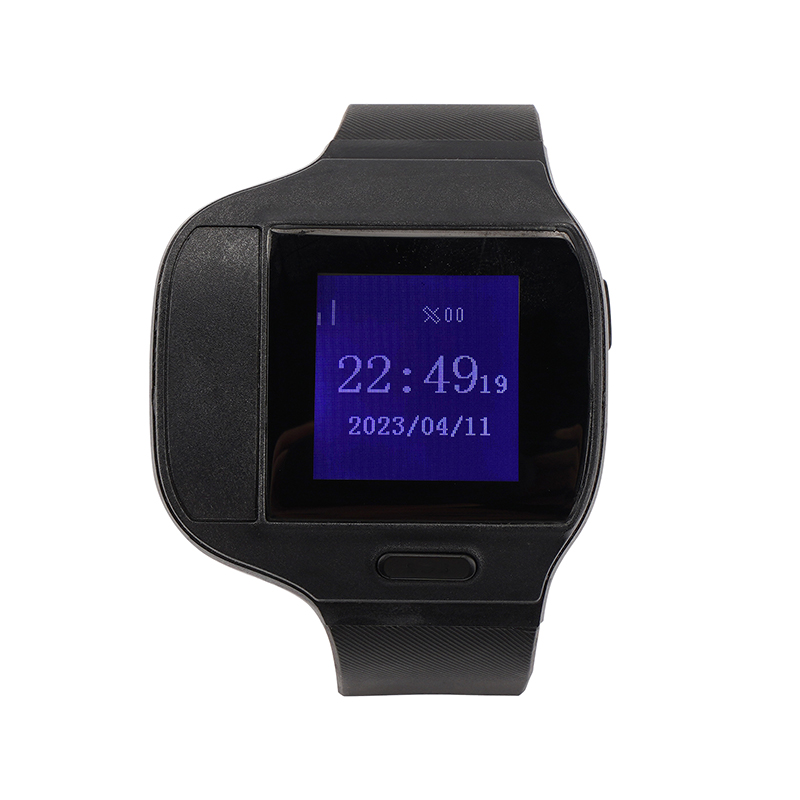


El MT80 Series Health Care GPS Watch de MT80 (nombre del fabricante según se indique) es un rastreador GPS compatible con ALTAGAMA GPS, diseñado para telemetría médica y localización continua en escenarios de cuidado al aire libre de personas mayores, monitoreo de pacientes y protección personal. Construido como un reloj inteligente 4G, la MT80 Series combina seguimiento en tiempo real con sensores de salud integrados en el cuerpo —incluyendo temperatura de la piel, SpO2 y frecuencia cardíaca— además de SOS, voz bidireccional y alarmas de evento para ofrecer conciencia situacional donde cada minuto cuenta.
Disponible en dos variantes de hardware (MT80BLE y MT804G), MT80 Series ofrece opciones de conectividad flexibles para su integración con ALTAGAMA GPS y otras plataformas estándar de rastreo GPS. Su diseño compacto y resistente al agua, la carga inalámbrica y el probado módulo GNSS Ublox MAX‑8Q hacen del MT80 un rastreador GPS fiable para personas supervisadas, trabajadores solitarios y activos que requieren telemetría de salud junto con datos de ubicación.
Puntos clave
- Rastreador GPS compatible con ALTAGAMA GPS: envía ubicación en tiempo real e informes de eventos a través de SMS/GPRS (TCP/UDP) a plataformas de rastreo estándar.
- Telemetría de salud integrada: temperatura de la piel, oxígeno en sangre (SpO2) y monitoreo de la frecuencia cardíaca (MT80BLE) para atención continua de pacientes y personas mayores.
- Variantes de conectividad dual: reenvío Bluetooth 5.0 (MT80BLE) o posicionamiento y subida asistidos por Wi‑Fi (MT804G).
- Posicionamiento satelital fiable: módulo GNSS Ublox MAX‑8Q para fijaciones GPS consistentes y consulta de historial de trazas.
- Características de seguridad integrales: alarma SOS, voz bidireccional, alertas de geocerca, batería baja, detección de cinturón puesto/quitar y alarmas de corte.
- Diseño duradero y ponible: clasificación IP66–67 a prueba de agua, carga inalámbrica y peso neto ligero de ≈ 75 g.
- Soporta protocolos de telemetría estándar y personalización de protocolo para integradores y despliegues OEM.
Cómo funciona con ALTAGAMA GPS
Integrar la MT80 Series con ALTAGAMA GPS es sencillo gracias al soporte del dispositivo para métodos de reporte estandarizados de la industria y a la personalización de protocolos. El reloj puede configurarse para entregar ubicación, eventos y telemetría de salud a los puntos de ingestión de ALTAGAMA GPS a través de TCP/UDP GPRS o SMS, posibilitando rastreo en tiempo real, alertas y reproducción histórica en el panel de ALTAGAMA GPS.
- Actualizaciones de ubicación y telemetría en tiempo real enviadas por SMS/GPRS (TCP/UDP) para rastreo en vivo en ALTAGAMA GPS.
- Reenvío de datos de salud: MT80BLE utiliza Bluetooth 5.0 para enviar temperatura, SpO2 y frecuencia cardíaca a un teléfono emparejado o a ALTAGAMA GPS a través del gateway del teléfono.
- Posicionamiento y carga de datos asistidos por Wi‑Fi en MT804G para mejorar la fiabilidad y la velocidad de las fijaciones en entornos urbanos.
- SOS, voz bidireccional y eventos de alarma (geocerca, batería baja, detección de cinturón puesto/quitar) reportados en tiempo real para coordinar respuestas rápidas.
- Personalización de protocolos y compatibilidad con terceros permiten a los integradores mapear los campos del dispositivo a la telemetría y al esquema de alarmas de ALTAGAMA GPS.
Visión general técnica
| Conectividad | Celular 2G/3G/4G (según variante); SMS/GPRS (TCP/UDP) |
|---|---|
| Bandas | Las bandas celulares varían según el modelo regional (soporta 2G/3G/4G confirmada) |
| Alimentación y batería | Batería de polímero Li‑ion de 430 mAh; carga inalámbrica soportada; gestión típica de energía de wearable con control de GPS encendido/apagado |
| Interfaces | Botón SOS, voz bidireccional, detección de cinturón puesto/quitar y corte; registro de datos GPRS; intervalos de reporte configurables |
| GNSS | Módulo Ublox MAX‑8Q (GPS); soporta GPS+LBS+AGPS (ambas variantes) y asistencia de posicionamiento por WIFI en MT804G |
| Bluetooth | Bluetooth 5.0 presente en MT80BLE para reenvío de sensores y emparejamiento con teléfonos |
| Gestión remota | Personalización de protocolos; compatible con plataformas estándar de rastreo GPS (p. ej., Teratrack, Navixy, iTrack, Gurtam, Traccar, Geotrucks) |
| Factor de forma | Reloj inteligente ponible; peso neto ≈ 75 g; carcasa impermeable IP66–67 |
Casos de uso
- Cuidado al aire libre de personas mayores y monitoreo de pacientes con Alzheimer — ubicación continua, eventos similares a caídas y telemetría de signos vitales para cuidadores y plataformas de monitoreo.
- Supervisión de personas en libertad condicional y protección personal — alarma SOS, alertas de geocerca y voz bidireccional para individuos supervisados que requieren responsabilidad.
- Seguridad de trabajadores solitarios y monitoreo de personal de campo — rastreador GPS ponible con monitoreo de voz y alarmas para mejorar tiempos de respuesta y la conciencia situacional.
- Monitoreo de salud centrado en activos — cuando datos biométricos del wearable combinados con la ubicación son relevantes para personal médico o primeros respondedores.
Por qué elegir este rastreador con ALTAGAMA GPS
La MT80 Series ofrece una combinación enfocada de telemetría de salud y seguimiento en tiempo real confiable dentro de un paquete compatible con ALTAGAMA GPS. Su probado módulo GNSS, múltiples opciones de conectividad y soporte para protocolos de reporte estándar facilitan la integración con ALTAGAMA GPS para una visibilidad inmediata a través de dispositivos y usuarios. Para organizaciones que necesitan más que localización —incluidos signos vitales, SOS y monitoreo de voz— la MT80 aporta profundidad telemétrica sin sacrificar la comodidad del wearable ni la duración de la batería.
Si bien el ecosistema más amplio de ALTAGAMA GPS también admite características de gestión de flotas, como ignición, control de inmovilizador y monitoreo de combustible, la MT80 Series está optimizada para la supervisión personal y la telemetría médica. Los integradores pueden utilizar la personalización de protocolos y las capacidades de informes de terceros del dispositivo para mapear los datos de MT80 hacia los flujos de trabajo, alarmas e informes de ALTAGAMA GPS, escalando desde despliegues de atención individual hasta proyectos OEM que requieren empaquetado y documentación de patentes.
Configurar MT80
Para configurar el rastreador envíe los siguientes comandos a través de mensajes de texto, En el ejemplo se asume que la contraseña del dispositivo es 6CP45K que es la inicial del dispositivo
- Configurar el identificador
M6CP45K,22,{{('XXXXXXXXXXXXXXX' + imei.substring(0,15)).slice(-15)}} - Configurar el APN del operador
M6CP45K,23,{{apn}},{{apnu}},{{apnp}} - Configurar el intervalo de actualización cada 60 segundos
M6CP45K,25,60 - Configurar el servidor GPRS
M6CP45K,24,56 54.85.159.138,8888 - Activar el modo GPRS
M6CP45K,21,2